Why am I receiving a compatibility message?
This article explains what the compatibility message means and how to resolve it.
On 11/10/26, Build 10803 of MeasureSquare 8 and Version 3.4.0 of MeasureSquare Mobile were released.
The messages
You may now encounter the messages below, indicating a mismatch between the build/version you are presently running, and the one used to create the file.
On 11/10/26, Build 10803 of MeasureSquare 8 and Version 3.4.0 of MeasureSquare Mobile were released.
The messages
You may now encounter the messages below, indicating a mismatch between the build/version you are presently running, and the one used to create the file.
What this means
If a project was created using the latest build, you will need to update your program to the latest build in order to open it. You may still open projects created using previous builds on the latest one, but not vice versa.
How to resolve this
To resolve this issue, simply update your programs.
Important: If you have both, make sure to update both of them.
MeasureSquare 8
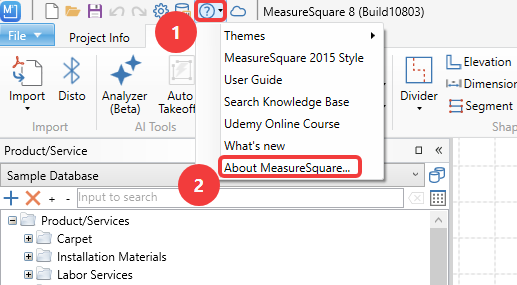
Click the Question mark button at the top left of the window, then About MeasureSquare.
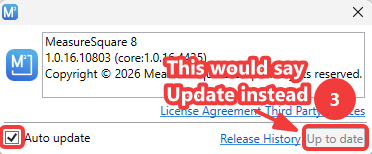
Click the Update button at the bottom right to update. Check the box for Auto Update at the bottom left to allow future updates to occur automatically.
MeasureSquare Mobile
Go to the App Store and type measuresquare mobile into the search box up top.
Tap Update to the right of the result for MeasureSquare Mobile.
Note: Updates are automatic unless the settings on your device are set to not allow it.
If a project was created using the latest build, you will need to update your program to the latest build in order to open it. You may still open projects created using previous builds on the latest one, but not vice versa.
How to resolve this
To resolve this issue, simply update your programs.
Important: If you have both, make sure to update both of them.
MeasureSquare 8
Click the Question mark button at the top left of the window, then About MeasureSquare.
Click the Update button at the bottom right to update. Check the box for Auto Update at the bottom left to allow future updates to occur automatically.
MeasureSquare Mobile
Go to the App Store and type measuresquare mobile into the search box up top.
Tap Update to the right of the result for MeasureSquare Mobile.
Note: Updates are automatic unless the settings on your device are set to not allow it.