How to use the Zoom functions in the Shop Drawing tab of MeasureSquare Stone
This article will show you how to use the zoom functions in the Shop Drawing tab of MeasureSquare Stone.
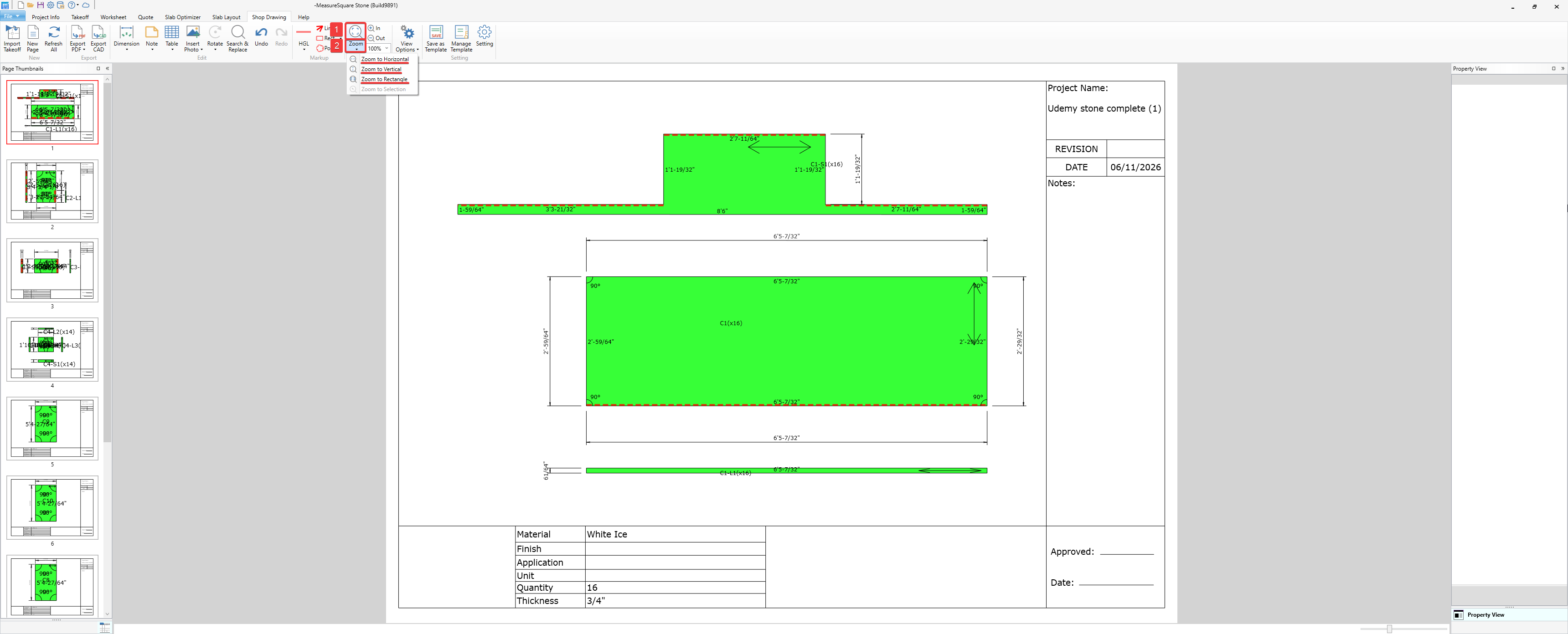
1. Magnifying glass button
Clicking on the magnifying glass button will zoom to fit the entire sheet within view
2. Zoom menu
Zoom to Horizontal - Will zoom to fit the entire sheet horizontally within the current window
Zoom to Vertical - Will zoom to fit all the sheet vertically within the current window
Zoom to Rectangle - Will zoom to fit a rectangular selection box area into current window view
2. Zoom menu
Zoom to Horizontal - Will zoom to fit the entire sheet horizontally within the current window
Zoom to Vertical - Will zoom to fit all the sheet vertically within the current window
Zoom to Rectangle - Will zoom to fit a rectangular selection box area into current window view
3. Zoom In/Out- Other than by using your mouse's scrollwheel, you can zoom in and out using the +In/-Out buttons
+In - Will zoom in from the current view
-Out - Will zoom out from the current view
+In - Will zoom in from the current view
-Out - Will zoom out from the current view
Bonus tip: You can scroll through the different pages by holding down the Ctrl key at the bottom left of your keyboard and using your mouse's scroll wheel.
If you need further assistance, contact MeasureSquare Customer Support at +1-626-683-9188 or email support@measuresquare.com.