How to Manage Sync Settings in MeasureSquare 8
This article explains how to manage Sync settings in MeasureSquare 8
Access System Settings
Step 1. Click the gear button at the top left of your window to access System Setting
Step 2. Click the Advanced tab

Access System Settings
Step 1. Click the gear button at the top left of your window to access System Setting
Step 2. Click the Advanced tab
Select Sync Settings and Save
Step 3. Check the box(es) to choose which Sync settings to save
Sync Projects Starting Up: Syncs projects upon opening MeasureSquare 8
Sync Projects Shutting Down: Syncs projects upon closing MeasureSquare 8
Sync Profiles Shutting Down: Syncs profiles upon closing MeasureSquare 8

Step 4. Click Save
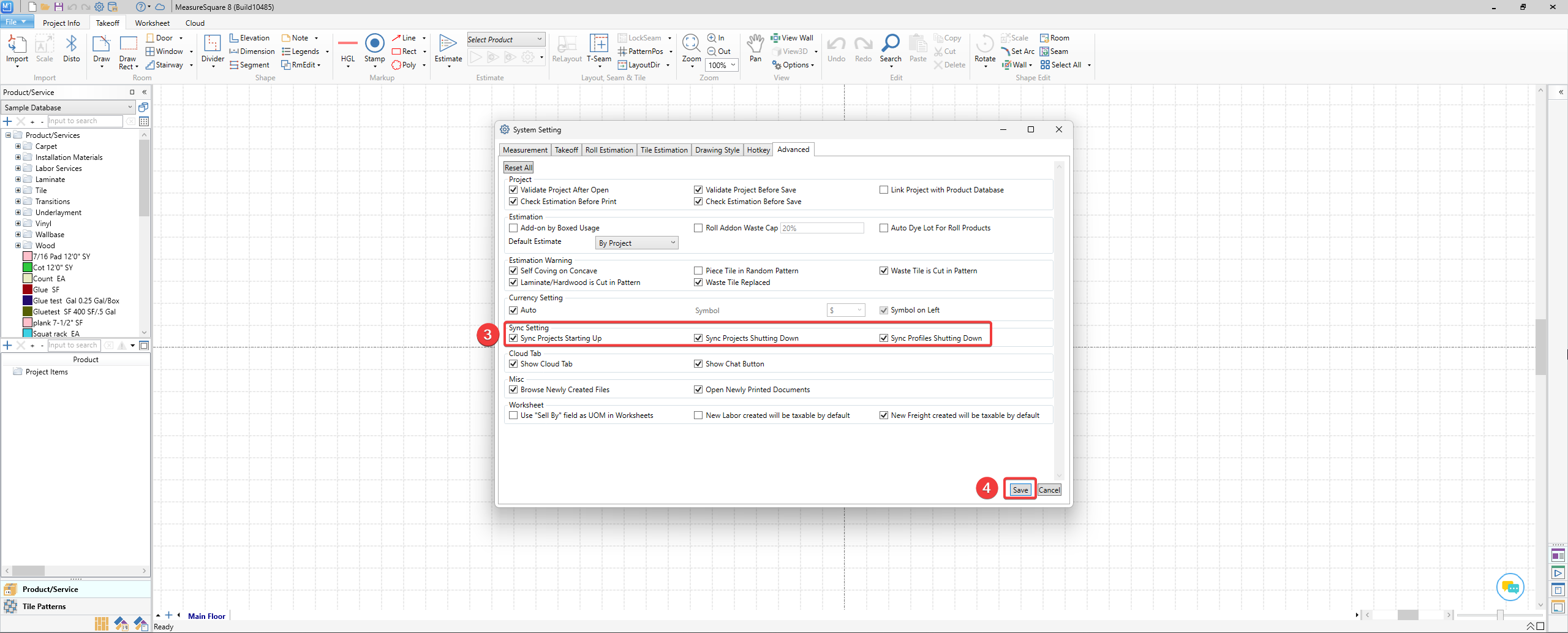
Sync Projects Starting Up: Syncs projects upon opening MeasureSquare 8
Sync Projects Shutting Down: Syncs projects upon closing MeasureSquare 8
Sync Profiles Shutting Down: Syncs profiles upon closing MeasureSquare 8
Note:
*Sync profiles will sync Product Catalogs (either upload/download or mark as conflicted), download Print Templates/HTML forms (if any), Bids (if any) configured in the Cloud, and download Settings if they are overwritten by the Cloud Group Admin.*
**Sync Profiles never uploads Settings. Use Upload Settings via File>Sync Settings>Upload Settings to do so instead**
*Sync profiles will sync Product Catalogs (either upload/download or mark as conflicted), download Print Templates/HTML forms (if any), Bids (if any) configured in the Cloud, and download Settings if they are overwritten by the Cloud Group Admin.*
**Sync Profiles never uploads Settings. Use Upload Settings via File>Sync Settings>Upload Settings to do so instead**
Step 4. Click Save