How to export PDF and CAD documents from the Shop Drawing tab in MeasureSquare Stone
This article will show you how to export PDF and CAD documents from the Shop Drawing tab in MeasureSquare Stone.
Export PDF
Step 1. Click the lower half of the Export PDF button and hover over Paper Size to make your selection
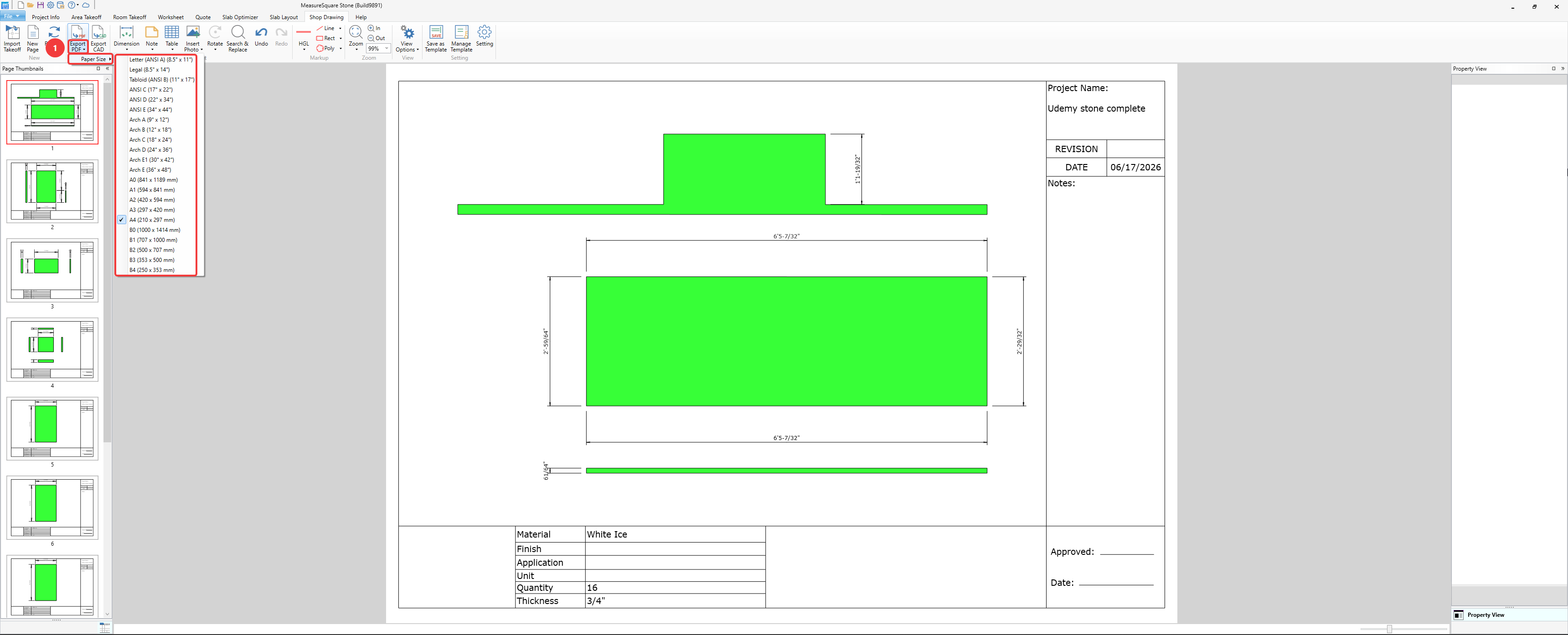
Step 2. Click the upper half of the Export PDF button
Step 3. Select the destination and click Save at the bottom right
Export CAD
Step 1. Click the Export CAD button
Step 2. Select the destination folder and click Save at the bottom right

Related Articles
How to create a Shop Drawing in MeasureSquare Stone?
This article will guide you through the steps to create a Shop Drawing in MeasureSquare Stone. Shop drawings are essential for detailing slab layouts, dimensions, and material specifications for fabrication. Steps to Create a Shop Drawing Step 1: ...
How to use the Zoom functions in the Shop Drawing tab of MeasureSquare Stone
This article will show you how to use the zoom functions in the Shop Drawing tab of MeasureSquare Stone. 1. Magnifying glass button Clicking on the magnifying glass button will zoom to fit the entire sheet within view 2. Zoom menu Zoom to Horizontal ...
Bringing a 3D Snapshot to Shop Drawing in MeasureSquare Stone
This article will provide a guide on how to bring 3D Snapshot from View3D to Shop Drawing. Before bringing a 3D Snapshot of the Slab to Shop Drawing, a KB article will be provided on how to Create a 3D Snapshot of the Slab: Creating a 3D Snapshot in ...
How do I Export my stone estimate from Slab Optimizer to a CAD file
This article will show you how to export your stone estimate to AutoCAD. This article applies to MeasureSquare Stone Build 8862 Step 1 : Complete your stone takeoff, worksheet, load the data in to the stone optimizer then start cut. Step 2 : Left ...
How do I Export my Stone takeoff to a CAD file.
This article will show you how to export your stone takeoff to AutoCAD file. This article applies to MeasureSquare Stone Build 8862 Step 1 : Complete your stone takeoff. Step 2 : Left click on the File Drop Down Menu and select the option for Export ...