How to close or delete an active project in MeasureSquare CRM?
In this article, we'll show you how to close or delete an active project in MeasureSquare CRM
Steps to close or delete an active project:
Step 1: Open an active project
Step 2: Click the three dots at the right top corner
Step 3: You can either close a project or delete a project here.
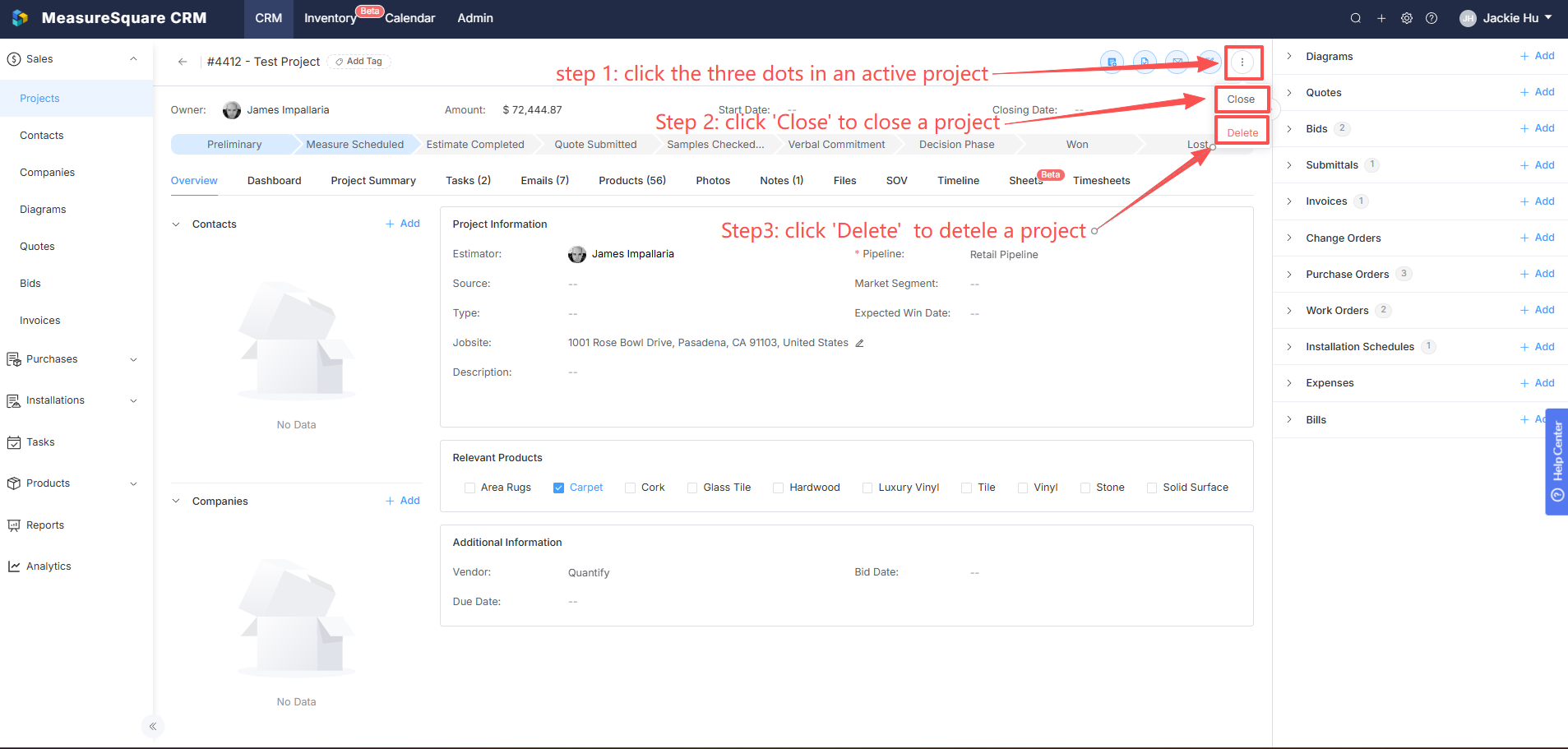

Note: Once you close a project, it can be reopened any time by following the same process.

Warning: Once you delete a project, it cannot be restored, so be careful when you want to delete any project.
Related Articles
How to manage everything in your MeasureSquare CRM project?
In this article, we will cover on how to manage everything inside of your Project View. This article applies to MeasureSquare CRM. Navigate to your desired project in order to have access to your Project View page. Steps to Manage Your MeasureSquare ...
How to Set Up Pipelines and Stages in MeasureSquare CRM
In this article, we will guide you through the process of setting up a pipeline and its stages in MeasureSquare CRM. Pipelines help you track the progress of your sales or project management workflows by breaking them into stages. This article ...
How to use the project email address in MeasureSquare CRM
In this article, we will show you how to use the project email address to track project-related emails in MeasureSquare CRM. You can link any email threads to your specific project by using the Project email address. You will just need to BCC this ...
How to Import Contacts in MeasureSquare CRM
In this article, we will cover how to import contacts into MeasureSquare CRM via CSV/XLS/XLSX, as well as QBO, Google, and Outlook. This article applies to MeasureSquare CRM. Steps to import contacts via CSV, XLS, and XLSX Step 1. From the homepage, ...
Stripe Integration with MeasureSquare CRM
In this article, we will cover an how to integrate with Stripe and how it's used in MeasureSquare CRM This article applies to MeasureSquare CRM version 1.38 and above. If you use Stripe to receive payments, and want to give customers an easy way to ...